


Smarter Product Discovery, Stronger Financials, and a More Reliable Platform
At Studio Designer, every update is designed to help interior design firms spend less time on administrative work and more time doing what they do best: designing. The April release takes a significant step forward with major enhancements to Catalog and Design Boards, alongside improvements to financial workflows, time tracking, and platform reliability.
This release builds on the foundation of recent updates with changes that make sourcing faster, financial data more trustworthy, and everyday tools more consistent. Here’s what’s new.
Catalog & Design Boards
April brings the most significant Catalog enhancements to date, making it easier than ever to discover, spec, and manage products without leaving Studio Designer. Designers can now browse 250,000+ SKUs from over 150 trade-focused brands directly in the platform.
Product specifications are now smarter and more connected. When creating items from catalog products, key details like brand, SKU, dimensions, finishes, and pricing are automatically pre-filled, saving time and keeping project data aligned from the start. Catalog products can be added directly into projects with structured specifications that carry through automatically, while still allowing edits at the project level.
Search and filtering have also been expanded to make sourcing faster and more intuitive. Designers can save preferred brands using the new Star icon, filter by brand, dimensions, and price tier, and search by color to match palettes and mood boards. A brand’s price tier ($$-$$$$) is now visible directly in search results, making it easier to stay aligned with client budgets from the start. Search quality has also been improved when combining filters with keywords and AI-powered search, creating a more consistent and relevant experience across the board.
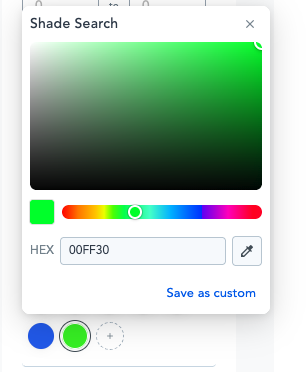

Design Boards have been enhanced with better organization and management tools, making it easier to arrange and refine project concepts as they evolve.
Finance
Financial workflows have been strengthened with improved tax handling, validation, and overall system reliability. These updates help firms maintain clean records and reduce the risk of errors before they become problems.
Audit history is now available for Sales Codes and Tax Locations, giving firms a clear record of changes over time. Required taxable field selections now prevent errors before they occur. Inventory receiving and financial updates are also more reliable across workflows.

Under Pending Payments, PayPal has been reclassified as E-Payments. For In Office Payments, the vendor Office Payments Description default will no longer include the “Office Payment -” prefix.
Greater Financial Accuracy and Reliability
This release brings meaningful improvements to how financial data is handled across payments, tax, and client communications, so firms can trust that what they see in Studio Designer reflects reality.
Payment posting, validation, and transaction handling are more reliable across workflows. Tax calculations are more accurate across scenarios and payment status, refunds, voids, and payouts now sync correctly across systems. Payment messaging has also been improved to give users clearer feedback throughout the process.
Client-facing payment communications are now more consistent and complete. Clients who pay via PDF in the legacy experience receive a clear Receipt email, while designers and contacts continue to receive the payment notification email. Receipt and notification emails now consistently include the relevant PDF invoice or proposal as an attachment, aligning with the experience designers and clients already know from the Client Portal.This release brings meaningful improvements to how financial data is handled across payments, tax, and client communications, so firms can trust that what they see in Studio Designer reflects reality.
Payment posting, validation, and transaction handling are more reliable across workflows. Tax calculations are more accurate across scenarios and payment status, refunds, voids, and payouts now sync correctly across systems. Payment messaging has also been improved to give users clearer feedback throughout the process.
Client-facing payment communications are now more consistent and complete. Clients who pay via PDF in the legacy experience receive a clear Receipt email, while designers and contacts continue to receive the payment notification email. Receipt and notification emails now consistently include the relevant PDF invoice or proposal as an attachment, aligning with the experience designers and clients already know from the Client Portal.
Stronger Time Tracking and Reporting
Accurate time tracking is the foundation of reliable billing, and this release sharpens both. Time entry accuracy has been improved and rounding is now consistent. Reporting calculations for rates and billable percentages reflect the correct values, and report formatting is more consistent, with footer and address display behaving predictably across different configurations.
Smoother Project and Inventory Management
Day-to-day project work moves more smoothly in this release, with improvements that reduce friction and keep data accurate. Navigating between items no longer prompts unnecessary unsaved change warnings, and inventory quantities update correctly after transactions, giving teams confidence in their records.
More Reliable Payroll
Payroll workflows are more dependable in April, with improvements to onboarding, account connections, and report generation. Firms can set up new users and run payroll reports without interruption, keeping operations on track.
From a transformed Catalog experience to tighter financial controls and a cleaner platform across the board, the April 2026 release reflects Studio Designer’s focus on giving design firms tools that work harder so they don’t have to.
Studio Designer is the leading digital platform for interior designers managing and growing their design businesses, featuring fully integrated project management, time billing, product sourcing, and accounting solutions.
Want to learn how Studio Designer can work for your design firm? Schedule a call with our team: https://www.studiodesigner.com/get-a-demo/
We can’t wait to connect.