

Studio Designer exists to keep every part of a design firm connected, from the first spark of an idea to the final invoice. This month’s release focuses on three things that shape daily work the most: sourcing and presenting design concepts, tracking time accurately, and giving both firms and clients more control at checkout. Here’s what’s new.
Catalog and Design Boards
Sourcing used to mean a dozen browser tabs, a folder of screenshots, and a search engine doing more work than the software itself. Catalog replaces all of that with direct access to thousands of items across furniture, lighting, textiles, and more, built right into Studio Designer and connected to the workflow designers already use. A piece can be found, refined to the exact spec, and brought into a project in just a couple of clicks.

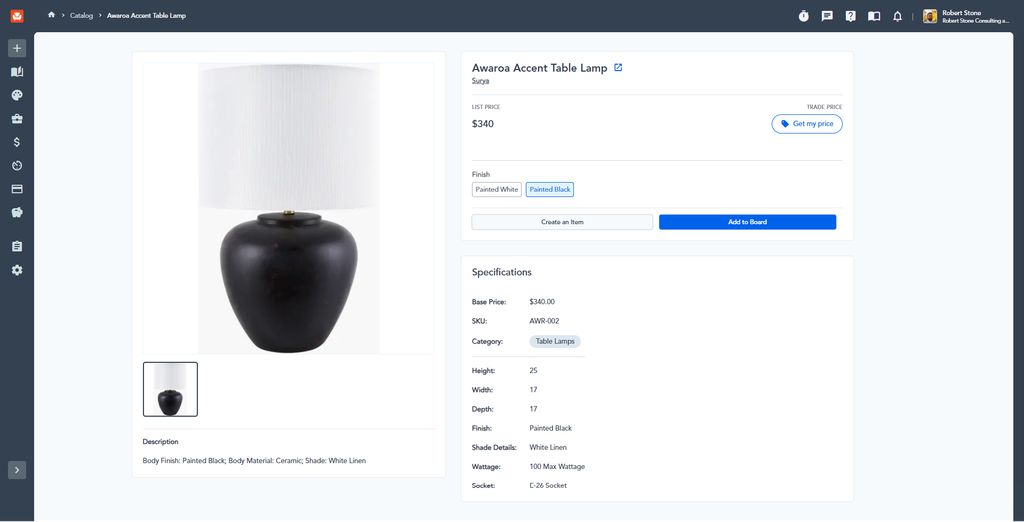
Finding that piece is fast, too. Designers can narrow by Category to start, then filter by Brand, starring favorites for one-click access later. Tight floor plan? Minimum and maximum width, depth, or height can be entered under Dimensions so only pieces that actually fit show up. Sourcing to a palette works the same way: clicking a Color swatch pulls every product in that family. For anything more specific, Custom Filters search by attribute, like finish or material, using a contains or exact match rule, and Price Range keeps sourcing on budget across four tiers. Every product’s detail page rounds out the picture with vendor, price, full specs by attribute group, a description, and a link to the vendor’s own page when one exists.
Once a piece is chosen, there are two paths forward. Create an Item pulls it directly into a project as a spec item, ready for a proposal, order, or invoice, just by filling in client, room, vendor, and sales code. Still in the concept phase? Add to Board pins it to a Design Board instead, ready for client presentation.

Design Boards give designers a fast, visual way to concept a room and present ideas without ever leaving Studio Designer. Found alongside the Inspiration Library, boards are organized by project folder, with as many boards inside each as needed, whether that means separating by room or laying two concepts, like a Modern Living Room next to a Traditional one, side by side for the same client. A cover image on each project folder makes the right one easy to spot at a glance.
Once a board has pieces on it, an AI rendering of the room can be generated in about 30 to 45 seconds. A reference image, whether a site walkthrough photo or a stock image, sets the background and mood, though it isn’t required; skip it, and the tool builds the room around the pieces already on the board. A prompt describes the feel, from furniture arrangement to rendering style to time of day, and the result combines that prompt, the reference image, and the actual product images into a rendering ready to drop into an email or presentation. It won’t hold up as a CAD-accurate drawing, but it’s a fast, polished way to show a client where a room is headed. Renders stay private to the firm; the tool doesn’t save them or use them to train future models.

Time Tracking
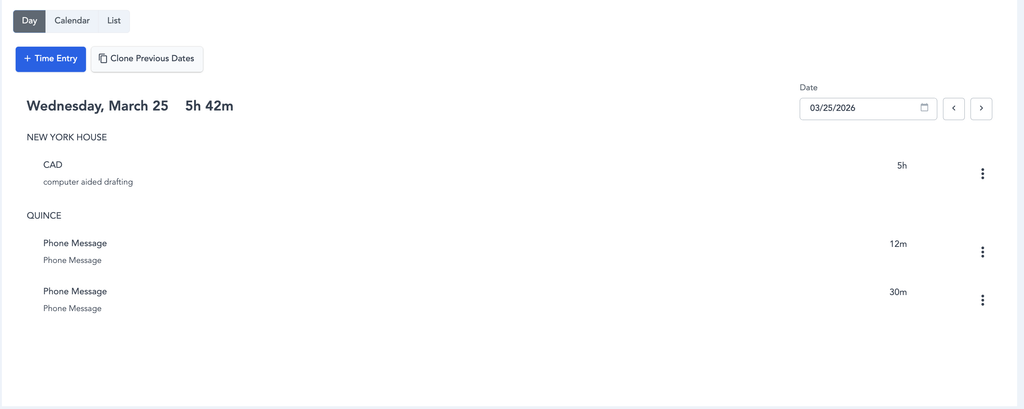
Time tracking finally gets a dedicated home. The new Timesheets experience is now available to every Payroll firm, and firms without Payroll can request early access through an opt-in form. Once submitted, the team turns the experience on directly.
Timesheets separates billable client hours from internal office time in one place, with no manual workarounds needed. A new entry can be logged against an existing client and activity, with either an end time or a duration, and edited, reviewed, or deleted anytime during the month. Three views make it easy to see time however makes the most sense: Day view breaks a week out by project and client, Calendar view shows a week in calendar blocks sized to hours worked, and List view spans a chosen week, month, or longer. Changes made in any view carry through to the others automatically. Firms using Payroll get an added layer of oversight, too, reviewing all employee time for the week in a single place before anything reaches a pay run, with the ability to correct entries that look off.

Payroll
Recurring stipends, like a phone or internet allowance, no longer need to be added by hand every pay period. Set one up once under Payroll > Configuration, and it appears automatically on that employee’s pay stub going forward. Payroll admins also now get automatic reminders ahead of each deadline, one day before for standard payroll and two days before for autopayroll, each including the pay period dates and what needs to be reviewed, so nothing slips through unnoticed.
Payments & Checkout
Custom Checkout now gives designers control over typeface across headers, headings, and body text, making the client-facing checkout experience feel more consistent with a firm’s own brand. Credit card fee pass-through is on by default for new and existing accounts, with clearer labeling and a recorded acknowledgment whenever it’s enabled. On PDFs, the “Pay Now” button is now labeled “Make Payment,” and approved proposals keep their green approval checkmark even after their items have been invoiced, so approval status stays visible at a glance. When sharing a PDF invoice or proposal, the theme dropdown now labels each option as Standard, Customizable, or Custom, making the choice clearer before sharing.
Finish Schedules, in Beta
Keeping finish details and specs organized gets easier with finish schedules, now definable for relevant workflows and rendered directly in the product interface for at-a-glance reference. Pulling together a client-ready spec document no longer means assembling it manually, either. Product Specification Reports can now be generated directly from item-level specs, with selected categories and items automatically organized into a standardized, shareable layout.
Additional Refinements
Beyond the major updates, this release cleans up a long list of smaller issues across the platform. Invoiced items keep the fields that should stay editable, purchase and selling-side pricing can be adjusted independently, and required address types are now protected from edits or deactivation. On the payments side, duplicate transactions are blocked correctly, email routing sends to the right addresses, and a handful of edge cases around item numbers, foreign exchange rates, and processing fee pass-through have been resolved. Accounting sees several fixes to journal entries, discount transaction details, HST calculations, and trial balance reporting, along with a fix to the Connect Bank Account button and the reconciliation pop-up. Reports now filter correctly on Priority (Color Name), and payroll classification now updates correctly when a contractor is rehired as an employee.
Between a faster path from sourcing to spec, a time tracking experience built for how firms actually work, and more control over how checkout looks and feels, this release is about giving designers less time on admin and more confidence in the details, so there’s more room for the design itself.
Studio Designer is the leading digital platform for interior designers managing and growing their design businesses, featuring fully integrated project management, time billing, product sourcing, and accounting solutions.
Want to learn how Studio Designer can work for your design firm? Schedule a call with our team: https://www.studiodesigner.com/get-a-demo/
We can’t wait to connect.