

TL;DR: The biggest struggle is visibility. As design firms grow, they end up running Excel, Harvest, ADP, QuickBooks, and Studio Designer all at once, and none of those systems talk to each other. That makes it nearly impossible to see a unified view of profitability, which means firms can’t tell where they’re actually losing margin or when they genuinely need to hire. The clearest signal that gets buried in this mess is utilization: designers consistently running at 100-130% capacity with no time left for anything but billable work.
Key Takeaways
- Running Excel, Harvest, ADP, QuickBooks, simultaneously prevents a unified view of profitability, since none of the data lives in one place
- Without full data visibility, firms can’t tell where margin is leaking or when they actually need to hire
- Utilization consistently at 100-130% is the clearest signal a firm has hit capacity and can support another hire
- Firm owners often make hiring and staffing calls off instinct, not data, because the data is too scattered to pull together in time to matter
- Retraining the team is real, unglamorous work, but having everything in one system is what actually positions a firm for future growth
The Root Problem: Nobody Can See the Whole Firm at Once
Ask a design firm owner how their business is doing and most can tell you how individual projects are going. Ask them how the firm as a whole is performing, margin by margin, person by person, and the answer gets fuzzier fast. That’s not because they don’t care about the number. It’s because the number doesn’t exist anywhere as a single, trustworthy figure.
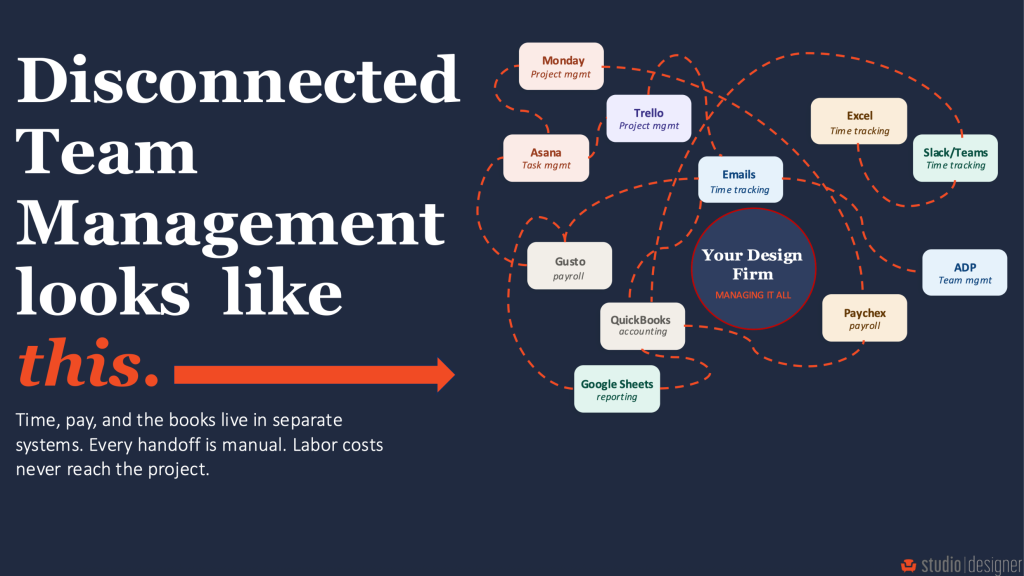
It’s common to find a firm running Excel for tracking, Harvest for time, ADP for payroll, QuickBooks for accounting, and Studio Designer for the actual project work, all at the same time. Each tool does its individual job well enough. But profitability isn’t an individual-tool problem. It’s a cross-tool problem: labor cost from ADP, hours from Harvest, and overhead from QuickBooks all must line up before anyone can say with confidence whether a project, or the firm, made money.
When that data lives in five places, nobody lines it up in real time. It gets reconciled at month-end, or at tax time, or not at all. By the time a firm owner sees the full picture, the moment to act on it has usually already passed. The designer who was over capacity for six weeks straight has already started looking for a job with better boundaries. The project that quietly ran over budget has already been invoiced at a loss.
Why Firms Don’t Fix This Sooner
The fix seems obvious from the outside: consolidate onto one system. In practice, firms rarely do it while they’re busy, and busy is the default state of a growing design firm.
Consolidating systems means retraining the entire team on new processes, re-mapping how time gets logged, how invoices get generated, and how payroll gets run. That’s real, unglamorous, front-loaded work. And it competes directly against the thing that actually generates revenue: client projects. So firms don’t prioritize it. They tell themselves they’ll deal with it after the current project wraps, then the next one starts, and the patchwork stays in place for another year, another two years, sometimes for the life of the firm.
The math rarely gets run on what the patchwork costs. Every month spent reconciling five tools by hand is a month of a bookkeeper’s or owner’s time that could have gone toward billable work or business development instead. The upfront cost of consolidating is visible and immediate. The ongoing cost of staying disconnected is invisible and cumulative, which is exactly why it’s so easy to keep deferring.
The Signal Hiding in the Mess: Utilization
Of everything that gets lost in disconnected systems, utilization is the one with the most direct line to a firm’s next decision. Utilization is simply the percentage of a person’s time that’s billed to active client work versus spent on everything else: admin, internal meetings, business development, training.
Look at one designer in isolation and the number tells a clean story. If they’re fully booked on a single project with nothing left over, their utilization is maxed out. Zoom out to the full team, and if that pattern repeats across everyone, with people sitting at 100%, sometimes as high as 130%, that’s not evidence of an efficient team. It’s evidence of a team with zero slack. No time for the admin work that keeps projects on track, no time to onboard a new client, no room to absorb a sick day without something slipping.
That’s the point at which a firm can, and should, hire. Not because morale is dropping or someone finally complained, but because the numbers say the team has been over capacity for a while.
The problem is seeing it. Utilization only shows clearly when time data, project data, and staffing data live in the same system. Split across Excel for tracking and Harvest for time, with payroll sitting separately in ADP; the pattern doesn’t surface until it shows up as a resignation letter or a missed deadline, both far more expensive than the hire would have been.
What Full Visibility Actually Changes
Utilization and hiring get the most attention, but the same disconnected-data problem shows up in smaller, constant ways that add up:
- Margin leaks go unnoticed. A project that’s quietly running over on hours doesn’t show up as a loss until it’s invoiced, because labor cost and project revenue live in different systems.
- Non-billable time creeps. Without a clear read on where hours actually go, admin and internal work can expand to fill more of the week than anyone realizes, cutting into billable capacity without anyone noticing until utilization drops.
- Payroll and time double as data entry, twice. When time tracking and payroll aren’t connected, someone is manually re-entering the same hours in two systems, which is both wasted time and a place where errors can creep in.
- Staffing decisions get made on gut feel. Without the numbers in front of them, owners end up hiring reactively, after burnout or a resignation, instead of proactively, off a utilization trend that’s been building for months.
None of these are dramatic on their own. Together, they’re the difference between a firm that knows its numbers and one that’s guessing.
How to Bring This Together
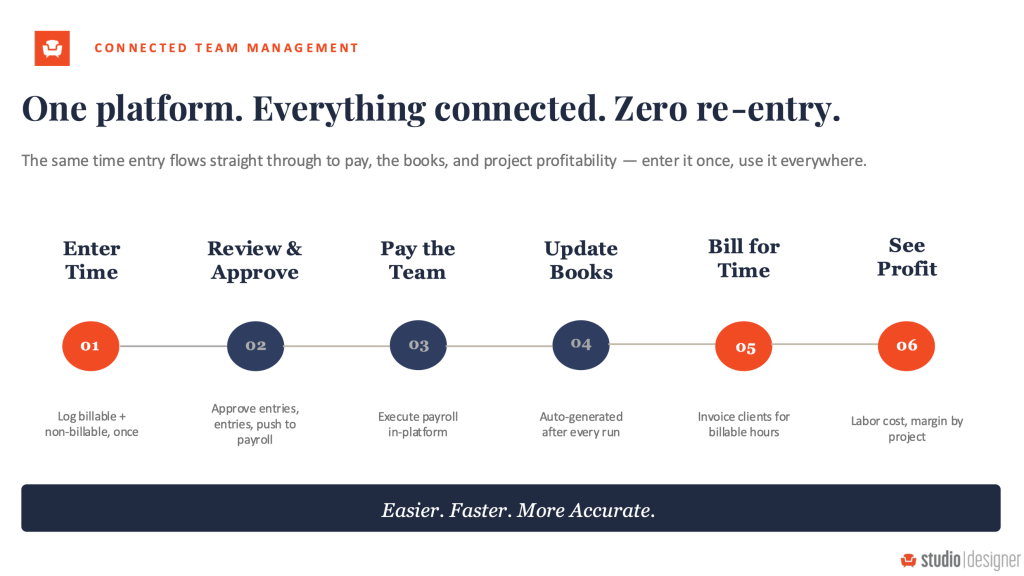
Studio Designer puts time, payroll, and project data in one system instead of scattered across five:
- Accurate time tracking across every project, so billed and non-billed hours are both visible in the same place they’re logged
- Utilization by team member, at a glance, instead of estimated after the fact or reconstructed from a spreadsheet
- Payroll connected directly to time data, so hours don’t get entered twice and payroll runs off the same numbers as project profitability
- Labor’s real impact on project profitability, visible project by project, not discovered at invoicing
Studio Designer is the single platform for running a design firm end to end, from the initial concept through project management, invoicing, payments, and team management, without stitching together Excel, Harvest, ADP, and QuickBooks just to see the full picture.
FAQ
Frequently Asked Questions
Where do design firms most commonly struggle as they grow?
Visibility. Running separate systems for time, payroll, accounting, and project management prevents a unified view of profitability, which makes it hard to catch margin leaks or know when to hire.
Why don’t design firms consolidate their systems sooner?
Consolidating takes training and process changes, which compete with client work for time. Since the cost of staying disconnected is invisible and spread out, while the cost of switching is upfront and immediate, firms tend to keep deferring it.
What utilization level signals a design firm needs to hire?
100-130%. When designers are consistently running at or above full capacity with no time left for non-billed work, the firm has outgrown its current staffing.
How does Studio Designer’s Team Management feature help with these problems?
It brings time tracking, payroll, and project profitability into one system, so utilization, margin, and staffing needs are visible directly instead of pieced together from separate tools like Excel, Harvest, ADP, and QuickBooks.
What is One Studio?
One Studio is Studio Designer’s platform for running an entire design firm in one place: project management, invoicing, payments, payroll, and team management, replacing the need for separate disconnected systems.
Studio Designer is the leading digital platform for interior designers managing and growing their design businesses, featuring fully integrated project management, time billing, product sourcing, and accounting solutions.
Want to learn how Studio Designer can work for your design firm? Schedule a call with our team: https://www.studiodesigner.com/get-a-demo/
We can’t wait to connect.