
Summary: This release introduces a rebuilt Time experience designed around the people who use it, launches Rendering Studio with the new Custom Piece mode, adds ACH/ACSS fee passthrough, and a introduces a new way to track your AI credits.
Time, Rebuilt Around Your Team
Time used to live on a single page designed for billing. As more of your team started tracking time, we knew it needed to work for everyone. So we rebuilt Time around the people who use it, with experiences made for each role.
For your team: Timesheets and the mobile app
Every billable hour starts with a time entry, so logging time should be fast and simple. Timesheets are built for the people doing the work: designers, project managers, and anyone else on your team who tracks their hours.

- Day view. See your day at a glance and add time in a few clicks.
- Calendar view. See your week at a glance and add time right on the calendar.
- List entry. Prefer working in rows? Switch to a list and enter time line by line.
- Close and edit in bulk. Logging the same work again? Clone entries and edit several at once instead of starting from stratch.
- Simpler time entry. Employees only fill out the details that are relevant to their role.
The Time Mobile App
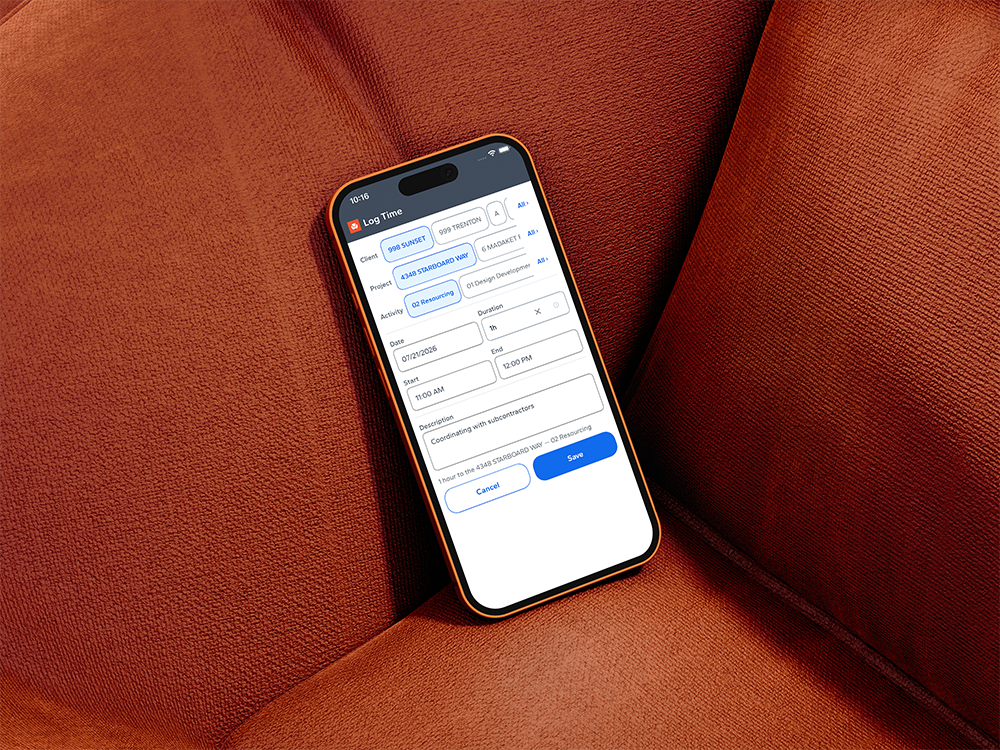
The new Time Mobile app brings the Timesheets experience to your mobile device. Whether your team is on a job site, at a showroom, or between client meetings, they can log hours from wherever the work happens.
For billing: the new Time Billing Page
The new Time Billing page is built specifically for the people who review time to bill clients. It builds on what already works, with the improvements billing admins have been asking for.
- Quick edits. Firms often bill a client for fewer hours than were worked. Now you can adjust billable time or the amount right in the row. Need to bill five of the ten hours worked? Just adjust it inline with minimal clicks.
- Tracked hours stay intact. The hours your team logged are kept as-is and can’t be changed from the billing page.
- Tracked and billed, side by side. Each time entry has its own row, with tracked time and billing time next to each other, and summary totals for time tracked and time to be billed.
- Clients only see what you bill. Invoices show the billed hours and amount, not the original tracked time.
More improvements to time billing are on the way before the end of the year.

Part of the Time and Team Management Suite (TTMS)
Time is the foundation of the Time and Team Management Suite (TTMS), our new suite for managing your people and the hours they put into every project. When time is easy to track and accurate to bill, you get a clearer picture of how your team works.
Get Early Access. Time + Team is in Early Access. Click below and a Studio Advisor will reach out to turn it on for you.
Introducing Rendering Studio
Rendering Studio is where early ideas become clear concepts your clients can see, right inside Studio Designer. Render a full room in Scene mode, or zoom in on a single item with the new Custom Piece mode.
Custom Piece
Apply a fabric, finish, or other change to a single item instead of the whole set. This gives you more control when refining an individual piece, without affecting the rest of the room. Try a bold print on a plain ottoman and see how it lands before you commit.

History Tab
Every render you create is saved to the History tab, so nothing gets lost as you explore different directions. Browse your previous renders anytime and restore any one of them to pick up right where you left off. Try a bold new material or layout without worrying about losing a version you liked.
@ Products
Type @ to bring a product right into your rendering.
Early Access and Betas
Want to try what’s next before anyone else? Raise your hand and our team will set you up.
Schedules (Beta)
Fully integrated Schedules are in beta now. Want us to set it up for you?
Bank Sync (Early Access)
A smarter way to keep your books in sync is on the way. Bank Sync brings all your bank accounts together in one place inside Studio Designer, so you can see what needs attention and keep your numbers accurate.
- Connections that keep working. Your bank accounts stay connected automatically.
- Guided matching. Match, split, and merge transactions right on the page, so the same charge is rarely entered twice.
- Access for the right people. Give a bookkeeper or outside partner access to just this work, without opening the rest of your firm’s information.
Early access opens in November. Be among the first to try it.
Single Sign-On (SSO) ( Early Access)
SSO arrives in November, and we’re looking for early adopters. Want it for your firm? Tell us a bit about your setup and we’ll see if you’re a fit for early access.
ACH and ACSS Fee Passthrough
You can now pass ACH processing fees on to your clients at the company, client, or document level. ACH fee settings are managed separately from card fees, and passed ACH fees flow through reporting and reconciliation the same way as other payment fees.
Canadian ACSS processing fees can now be passed to clients at checkout, and ACSS fee settings are managed alongside your other payment fee options.
Bug Fixes and Smaller Improvements
AI Usage Tracker
Keep tabs on your AI credits right from your profile. See how many credits you’ve used at a glance, so you always know where you stand.
For the complete list of fixes and enhancements in this release, see the full release notes.