
Summary: November is our biggest release yet. It adds the Team Management Dashboard and draft invoicing to the Time & Team Management Suite (TTMS), rebuilds Studio Capture with AI, and opens access to Canvas, StudioIQ, the rebuilt Bank Sync, and Single Sign-On.
Time & Team Management Suite (TTMS)
TTMS helps you understand how your team spends its time and turn that time into accurate invoices.
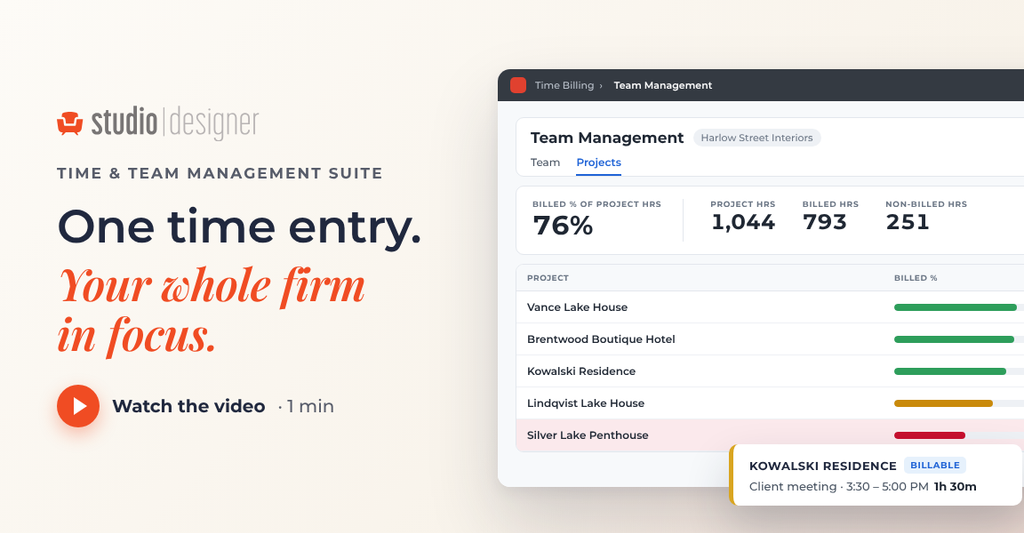
Team Management Dashboard
See where your team’s time goes. The Team Management Dashboard shows your team’s working hours next to billed hours, so you can see at a glance how much of your team’s time is reaching clients.
- By employee. See each person’s working and billed hours.
- By activity. Understand which types of work take the most time.
- By project. Compare time spent and time billed across projects.
Many design firms aim to bill 70–80% of paid hours to clients. The dashboard makes it easy to see where your team stands.
Also new in Time: Save invoice previews as drafts
When you preview an invoice in the new Time Billing, you can save that preview as a draft.
- Review before you send. Share the draft with a project manager or principal for review.
- Edit as needed. Make changes based on their feedback.
- Finalize when ready. Turn the draft into a final invoice.
Enter time on the behalf of others
Billing and payroll admins can now add time entries for other users from their admin pages, which helps when someone forgets to log their hours. Assistants can also add time to the timesheets of the people they support, such as a principal whose time is billed to clients.
See it live: Run Your Firm Smoother: New Tools for Time, Invoicing, and Security · Thursday, December 3 · 2 PM ET / 11 AM PT · Register
Studio Capture, Rebuilt with AI
Studio Capture, the Studio Designer browser extension, has been rebuilt with AI. Click Fill with AI on any product page and it captures complete specifications for you.
Launching in the Chrome Web Store on Monday. Already have Studio Capture? It updates automatically.
Fill with AI
Open Studio Capture on a product page and select Fill with AI. It pulls in the product image, price, SKU, category, and detailed specifications automatically. Review the details and edit anything before you save.

Your specs, ready for schedules
The specifications you capture are what power your schedules. Capture products with Fill with AI, and you can build schedules right in Studio Designer, in the same place you manage procurement.
Save to an item or a Design Board
Save what you capture as an item in your project, with its category and specifications carried through, or send it to a Design Board. Studio Capture can remember your project and image folder between captures, so adding several products goes faster.
Canvas (Early Access)
Design where your procurement lives. Lay out your concept, keep every piece connected, and create items for procurement with a click.
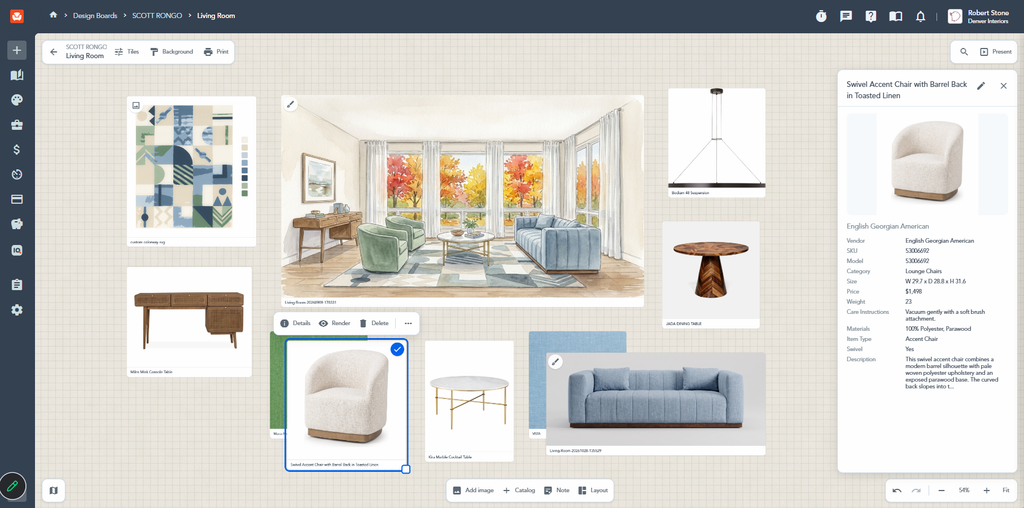
It’s not just an image
Your canvas knows everything about the products you’re designing with. Select any product to see its full details, from vendor and SKU to size, materials, and price. Those details stay attached as you move from canvas to item, so nothing gets disconnected and you don’t need a separate spreadsheet to keep track.
Integrated with Rendering Studio
Send renders straight to your canvas and see them alongside the products that inspired them.
From canvas to items
After approval, create items with every field already populated.
Explore your options
- Add from Catalog. Search Catalog right from your canvas. Anything you add also lands on your Design Board.
- Add your own images. Drag and drop photos from your computer, like a piece from your inventory. Images are marked with an image icon.
- Add notes. Place notes next to items as you work through ideas.
- Arrange freely. Resize and layer items, use alignment guides to line things up, and undo or redo as you go.
- Pick up where you left off. Your canvas saves automatically.
Customize and print
- Adjust the view. Show or hide item and vendor names, choose a frame style, and pick a background color or pattern.
- Print what you need. Print the whole canvas or just the area in view, choose which details to show, and pick a paper size or a clean grid layout without changing your canvas.
See it live: From Sourcing to Spec: What’s New in Catalog, Rendering Studio, and Studio Capture · Thursday, November 19 · 2 PM ET / 11 AM PT · Register
StudioIQ (Early Access)
ust ask. Ask a question in plain language, and StudioIQ answers using your firm’s own Studio Designer data. Try questions like:
- “Which clients have overdue invoices?”
- “What were our most profitable projects last quarter?”
- “Which open projects have items that haven’t been ordered yet?”
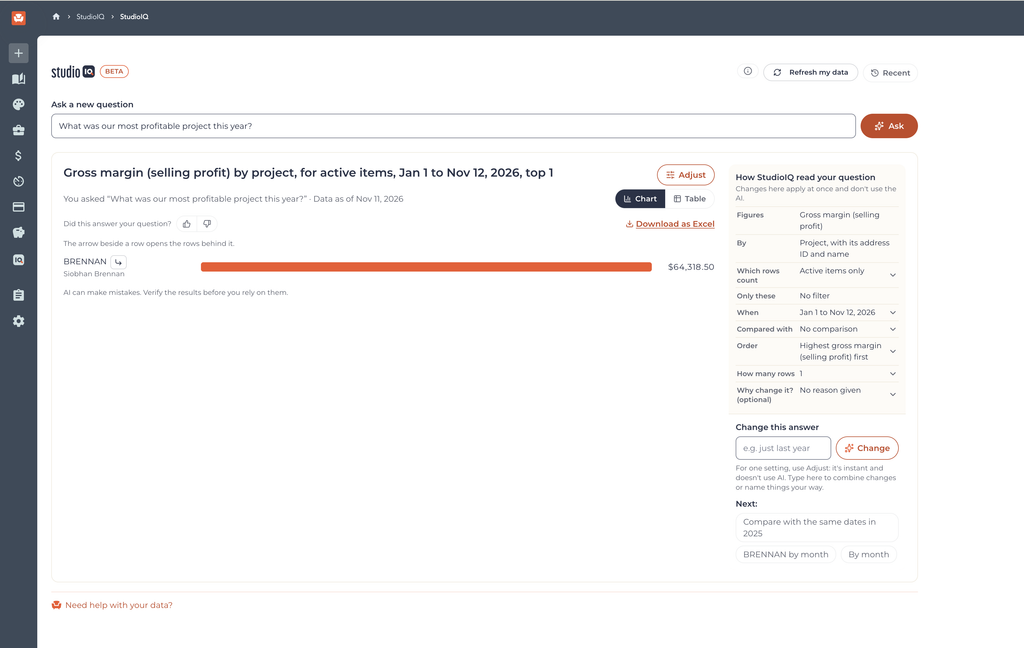
During early access, the questions you ask and the feedback you share help us improve how StudioIQ answers the questions designers care about most.
Get In Early
Get access to our newest features first.
Bank Sync
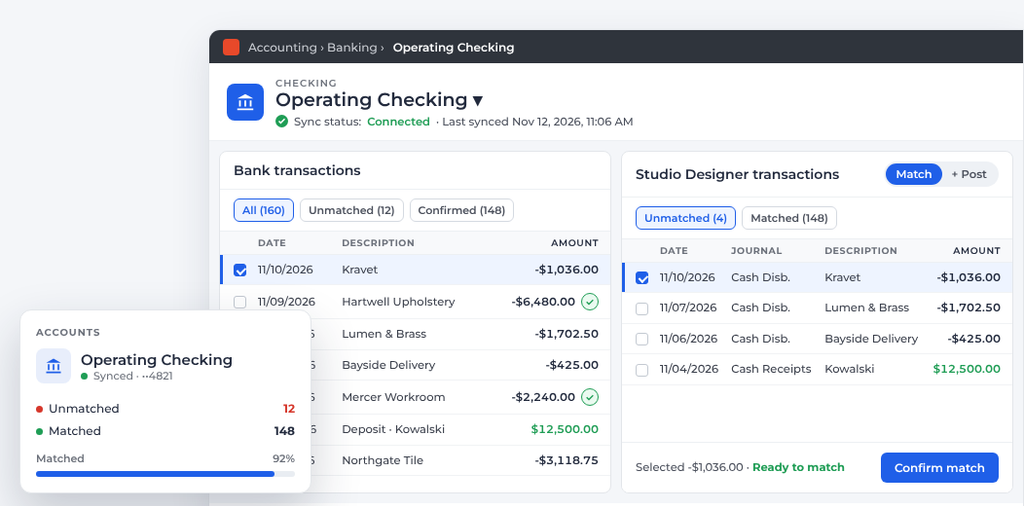
We’ve rebuilt Bank Sync. One view shows every account and what still needs your attention.
- Match, split, and merge. Work through transactions without leaving the page, which helps prevent duplicate entries.
- Clear connection status. Connections are built to stay reliable, and if one does drop, clear warnings tell you what happened and how to reconnect.
- Simple import. Connect your bank directly or import a CSV from your bank, map your accounts, and import your transactions.
CTA button: Join Early Access → https://go.studiodesigner.com/bank-sync-early-access-november-2026
Schedules
Do your schedules where you do your procurement, right inside Studio Designer. Products captured with Fill with AI bring their specifications with them, so your schedules are ready to build.
Single Sign-On
Log in to Studio Designer without entering a password.
Upcoming Webinars
From Sourcing to Spec: What’s New in Catalog, Rendering Studio, and Studio Capture
Thursday, November 19 · 2 PM ET / 11 AM PT
Join Robert Stone, Director of Designer Experience, for a live walkthrough of this release’s design and procurement updates.
CTA button: Register Now
Run Your Firm Smoother: New Tools for Time, Invoicing, and Security
Thursday, December 3 · 2 PM ET / 11 AM PT
See Studio Designer’s latest tools built to help you keep the business side of your firm moving. We’ll tour the Team Management Dashboard, build a draft invoice from tracked time, show how Bank Sync brings your bank activity into Studio, and walk through signing in with Single Sign-On.
CTA button: Register Now
Material Bank in Catalog
Studio Designer has partnered with Material Bank, the sample service used by hundreds of design brands, to bring tile, stone, and carpet into Catalog.
- About 100,000 products. Browse tile and stone, carpet, and select rugs right in Catalog.
- Request samples in a click. Select Request Sample on a Material Bank listing to go to Material Bank and add it to your cart.
- One delivery. Add as many samples as you need to your Material Bank cart, and they ship together.
Want to see a brand in Catalog? Suggest it in the Idea Portal.
Update: Subscription Roles for Users
Every user in your Studio Designer account now needs a subscription role to access the platform.
- Existing users. Everyone already using Studio Designer is automatically assigned the Studio Designer User role, so there’s no disruption to their access or billing.
- Adding a user. Assign new users a subscription role, such as Studio Designer User, on their employee profile.
- Deactivating a user. When you make a user inactive, their subscription roles are removed automatically.
Where Should AI Save You Time First?
AI is changing how every business runs, and our job is to make sure you have the AI tools you need to run your firm. We want to take the most tedious parts of running a design business off your plate. Tell us which ones we should tackle first.
Bug Fixes and Smaller Improvements
For the complete list of fixes and enhancements in this release, see the full release notes.