


A project is underway, items have been ordered, and the client has already made payments. Then a return comes up. On the surface it seems simple: the client is owed a credit, maybe toward a replacement, maybe on a future invoice. The vendor will issue one too, though rarely on the same timeline. The complexity is in how you track it all.
When One Return Requires Five Different Conversations
In most firms, purchasing and accounting live in separate systems. Invoices and payments run through the accounting platform. Product selections and orders are tracked somewhere else. Vendor credits and partial refunds often end up in a spreadsheet.
Each system holds part of the picture. None of them show the full sequence.
So when something changes, the team has to go hunting. Take a client who returns a $5,000 sofa and selects a $4,200 replacement. Someone now needs to confirm:
- Whether the original invoice has been adjusted
- Whether the client credit has been applied
- Whether the vendor has issued their credit
- How to handle the $800 difference
That information exists, it is just not connected. Even a clean, simple swap can take several steps to sort out. The problem compounds when vendor credits are slow to come through or when multiple changes pile up in the same project. Figuring out what has been refunded versus what is still outstanding eats up time, and small discrepancies are easy to miss.
ALSO READ: “How Should I Budget This Project?” – Three Ways to Budget Residential Design
How Studio Designer Keeps Everything on One Record
The difference in Studio Designer is not just convenience, it is structure. Financial activity is tied directly to the item. Invoices, payments, credits, and refunds all live on the same record, so when something changes, the system reflects the full sequence automatically.
With that same sofa return, the team can pull up one record and see:
- The original invoice for the sofa
- The client payment applied to it
- The credit issued at return
- The vendor credit when it comes in
- The replacement item and its cost
No cross-referencing, no reconciliation. The financial impact is just there.
Client refunds stay linked to the original transaction, which keeps the audit trail clean. Credited items remain in the system and can go back into inventory if needed. And because vendor credits are tracked alongside client-facing activity, cost recovery and client impact stay aligned without extra effort.
Giving Clients a Clear Answer Without Digging for It
In a multi-system setup, answering “can you walk me through my payments?” often means pulling reports from a few different places, cross-checking the details, and hoping nothing was missed. The answer may well be accurate, but it takes time to build.
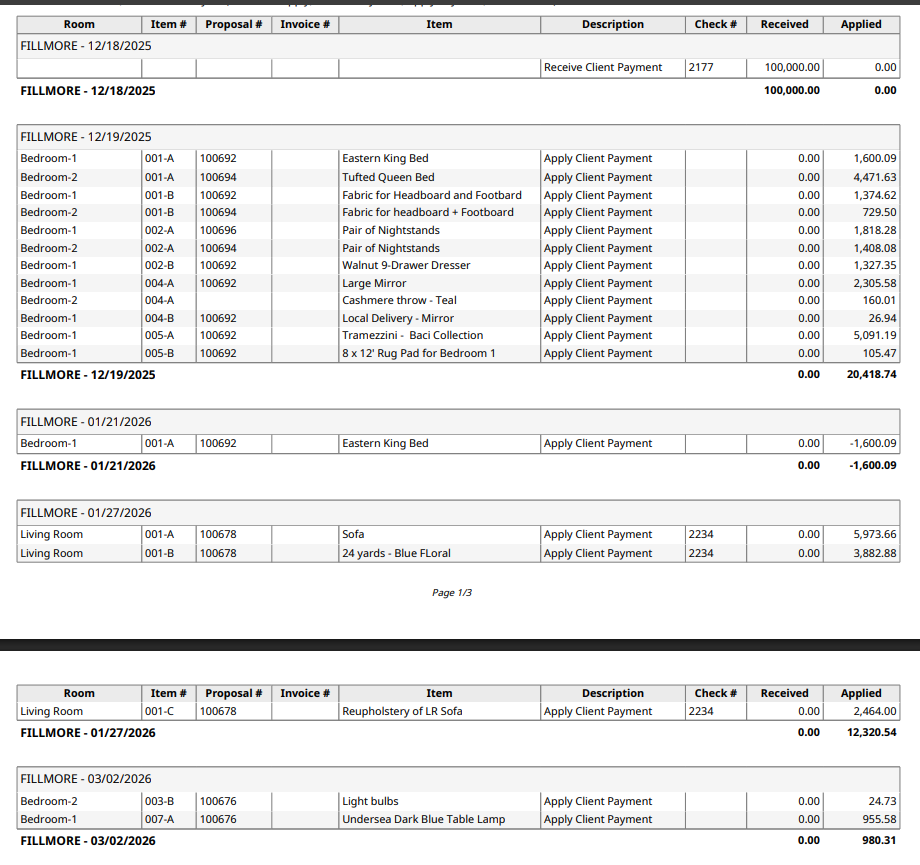
In Studio Designer, the Payment Application by Date report does that work automatically. It shows how each payment has been applied over time, including original invoices, reallocations, credits, and refunds, in sequence. You can review it and share it directly with the client.
What Integration Actually Changes Day to Day
Managing purchasing and accounting in separate systems can work. Plenty of firms do it, and with tight internal processes, they manage well. But it requires constant coordination, and someone always has to be the bridge between tools.
When those functions are integrated, that coordination disappears into the background. Financial activity stays aligned with the item and the project. Returns, reselections, and adjustments can be reviewed without reconstructing what happened. Both the design team and accounting team spend less time verifying numbers and more time trusting them.
Over a long project, that consistency shows up in clearer client communication, cleaner reporting, and fewer late nights chasing down discrepancies.

Written by Robert Stone
Director of Client Experience
With over 20 years of experience in the design industry, Robert Stone brings both expertise and passion to his role as Director of Designer Experience at Studio Designer. He partners closely with Sales, Marketing, and Product teams to make sure designers have a seamless experience from first introductions to long-term partnership. Known for his deep understanding of the design community, Robert is dedicated to ensuring that every interaction with Studio Designer reflects our commitment to putting designers at the center of all we do.
Studio Designer is the leading digital platform for interior designers managing and growing their design businesses, featuring fully integrated project management, time billing, product sourcing, and accounting solutions.
Want to learn how Studio Designer can work for your design firm? Schedule a call with our team: https://www.studiodesigner.com/get-a-demo/
We can’t wait to connect.