


Most interior designers already have access to AI tools. The real challenge isn’t availability, it’s fit: figuring out where AI actually belongs in a firm that already has a full workload. AI becomes useful when it’s tied to one specific, repeatable task and folded into a workflow you already run, not when it’s just another thing to keep up with.
Key takeaways:
- AI works best on structured, repeatable tasks, not open-ended creative or client-facing decisions
- The four highest-value use cases for design firms are content creation, research and sourcing support, admin work, and rendering
- Tools that connect research, sourcing, and visualization in one place, like Studio Designer’s Connected Catalog, cut down on the handoffs that make AI feel like extra work instead of saved time
- Start with one task and one tool, apply it consistently, and expand once it’s actually saving time
Client expectations remain high, marketing needs constant attention, and projects still involve coordinating vendors, timelines, and budgets. Dropping AI into that environment without a clear purpose only adds to the pressure. Many designers describe testing a tool, setting it aside, and going right back to their old workflow. Usually it’s not that the tool failed. It’s that it never had a real job to do.
The way out of that pattern is narrowing the scope.
Where Does AI Show Up in a Design Firm?
Content and marketing
Tools like ChatGPT and Claude are most commonly used here, supporting writing, editing, and structuring content.
A typical scenario starts with a completed project. A designer has photos, material selections, and a general sense of the client’s goals, but turning that into consistent content takes time. Instead of writing from scratch, the designer inputs a short description:
“Modern coastal kitchen with white oak cabinetry, integrated appliances, and a focus on low-maintenance materials. Write 3 Instagram captions.”
The tool returns several options with different angles. One focused on design intent, another on materials and sourcing, another on how the space functions day to day. The designer picks one, adjusts the wording, and schedules the post.
That same input can be reused across multiple formats: a short Instagram caption for visibility, a longer project description for the website, a client-facing email highlighting the work, or a draft blog post to expand later. One project becomes multiple pieces of content without repeating the same effort.
Research and sourcing support
Tools like ChatGPT, Claude, and Perplexity help structure information quickly, especially when preparing for client decisions.
A designer evaluating flooring options might ask: “Compare white oak vs walnut flooring for durability, maintenance, and cost in a high-traffic residential setting.” The response covers durability differences, maintenance expectations, and general cost positioning, giving the designer a useful starting point before confirming details with vendors.
But research only goes so far without sourcing. This is where tools like Studio Designer’s Connected Catalog start to play a more practical role in the workflow. Instead of jumping between vendor sites, spreadsheets, and mood boards, designers can move directly from research into real, spec-ready products. Browsing 250,000+ SKUs from trade-focused brands in one place makes it easier to validate ideas quickly and keep momentum without switching tools.
Another common use is setting expectations early. When specifying unlacquered brass in a kitchen, a designer might ask what the common maintenance issues are and how to explain them to clients. From there, they can immediately explore actual product options inside Connected Catalog, aligning material education with real selections. Addressing these questions before installation reduces friction later in the project.
Administrative work
Many design tasks follow repeatable formats, and writing them from scratch each time adds unnecessary effort. A designer preparing a client update might input: “Write a client update email. Flooring approved, cabinetry delayed 2 weeks, confirm revised timeline and upcoming invoice.” The output includes a clear summary, next steps, and a professional tone that’s ready to send after a quick review.
This approach works well across several recurring tasks: drafting proposals from scope notes, writing onboarding emails for new clients, responding to inquiries with consistent language, and summarizing meetings into clear follow-ups. The structure stays consistent, and only the project details change.
AI rendering
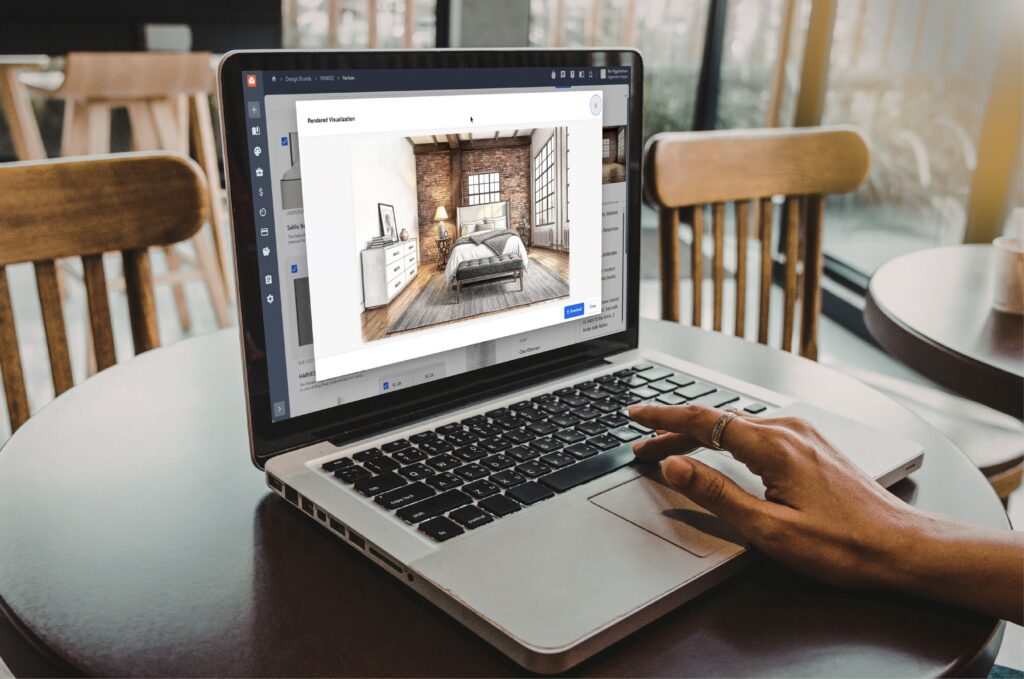
AI rendering tools are becoming a practical part of the early design process. Rather than waiting on a dedicated renderer or external software, designers can take a concept and produce a clear visual quickly, making it easier to communicate ideas to clients before sourcing is finalized.
Studio Designer’s Catalog makes this especially powerful because the rendering is already connected to the rest of the project. Build a Design Board with products sourced from 250,000+ trade-focused brands, upload a reference image, add a prompt describing the mood or style you’re after, and generate a rendered visualization without leaving Studio Designer. Because everything lives in the same place, moving from concept to client presentation becomes a single workflow instead of a series of exports and handoffs.
What AI Handles Well
AI performs best when a task is structured and repeatable, most effective when the format stays consistent and the inputs are predictable. Common uses include turning short notes into a complete project description, expanding bullet points into a blog draft, structuring proposals with clear sections, and drafting standard responses to client inquiries.
It’s also useful for quick comparisons. A prompt like “Summarize pros and cons of quartz vs marble countertops for a family kitchen” returns a structured overview that can be refined before presenting options to a client, shortening prep time without replacing the decision-making itself.
How Do You Start Integrating AI Without It Taking Over?
Starting small makes adoption easier to stick with. A simple structure looks like this:
- Choose one recurring task: content, emails, sourcing, or presentations
- Use one tool consistently rather than testing several at once
- Apply it the same way each time so the output stays predictable
- Store outputs in a consistent location so the team can find and reuse them
- Review and refine as part of your normal workflow, not as a separate step
This creates a system that fits into how you already work, rather than adding another layer on top of it.
Sourcing and visualization are areas where AI can fit especially well when they’re part of the same workflow. Instead of researching products in one place, building a board in another, and rendering concepts in a separate tool, platforms like Studio Designer’s Connected Catalog bring those steps together. Designers can browse real products, build selections, and generate visualizations without leaving the platform, which makes it easier to fold AI into a process that already exists instead of creating a new one.
How Do You Know If an AI Tool Is Worth Keeping?
A tool earns its place when it reduces the time a task takes, produces a draft you can actually edit into a final version, and improves consistency across projects or communication. It’s less useful when it requires new systems, produces inconsistent output, or interrupts a workflow that was already working.
A practical test: if Claude or ChatGPT consistently turns project notes into usable captions, it’s supporting your process. If the output needs multiple revisions and still doesn’t match what you need, it’s adding time rather than saving it.
The same test applies to sourcing and visualization tools. If moving from product discovery to rendering to specification requires several handoffs, the process slows down. If those steps are connected, so selections, visuals, and project items all live in one place, the tool supports the workflow instead of fragmenting it.
AI is becoming part of how design firms operate, but it doesn’t have to happen all at once. Start with one task, use one tool, and build a repeatable workflow from there. For most designers, the goal is straightforward: spend less time on repetitive work while keeping control over creative and client-facing decisions.
FAQ
Is AI going to replace interior designers?
No. AI handles structured, repeatable tasks well: drafting captions, summarizing research, generating quick renderings. But it doesn’t make design decisions, manage client relationships, or exercise creative judgment. It’s support for those tasks, not a replacement for them.
What AI tools do interior designers use most?
ChatGPT and Claude are the most common for writing and editing content, drafting emails, and summarizing information. Perplexity is often used for research. Design-specific platforms like Studio Designer’s Connected Catalog add AI-powered rendering and product sourcing that general-purpose tools can’t offer, since they’re connected to real, spec-ready inventory.
Where should a design firm start with AI?
Start with one recurring task that already has a predictable format. Client update emails or Instagram captions from project notes are common starting points. Apply the same tool the same way each time before expanding to a second use case.
What’s the difference between a general AI tool and a design-specific platform?
General tools like ChatGPT are strong at language tasks: writing, summarizing, comparing. But they don’t have access to real product data. Design-specific platforms like Studio Designer connect AI features directly to a catalog of 250,000+ SKUs, so sourcing, rendering, and specification happen in the same workflow instead of requiring exports between tools.
How do you know if an AI tool is actually saving time?
Track whether outputs need heavy editing. If a tool consistently produces a draft you can lightly revise and send, it’s working. If it takes several rounds of rewriting or doesn’t match your process, it’s adding time rather than saving it.
If you are evaluating payroll options or looking to simplify your current process, it may be worth reviewing how an integrated approach would work for your firm.
Schedule a demo or connect with your Studio Designer representative to learn more: https://www.studiodesigner.com/get-a-demo/
We can’t wait to connect.