


TL;DR: Catalog is a new sourcing tool built directly into Studio Designer. It gives designers searchable access to 500,000+ products from 250+ trade brands, including Visual Comfort, Lee Jofa, Schumacher, Kravet, Arteriors, Four Hands, Currey & Co., Holly Hunt, Hickory Chair, and Phillips Collection. It combines AI-powered search, visual concept boards, AI rendering, and direct project specification in one connected workflow. It’s rolling out now to all Studio Designer customers at no additional cost.
For most interior designers, sourcing means a dozen browser tabs, saved screenshots, vendor sites bookmarked across three different devices, and the constant mental overhead of keeping it all straight. By the time a product makes it from discovery to a project proposal, it has passed through more tools than it should.
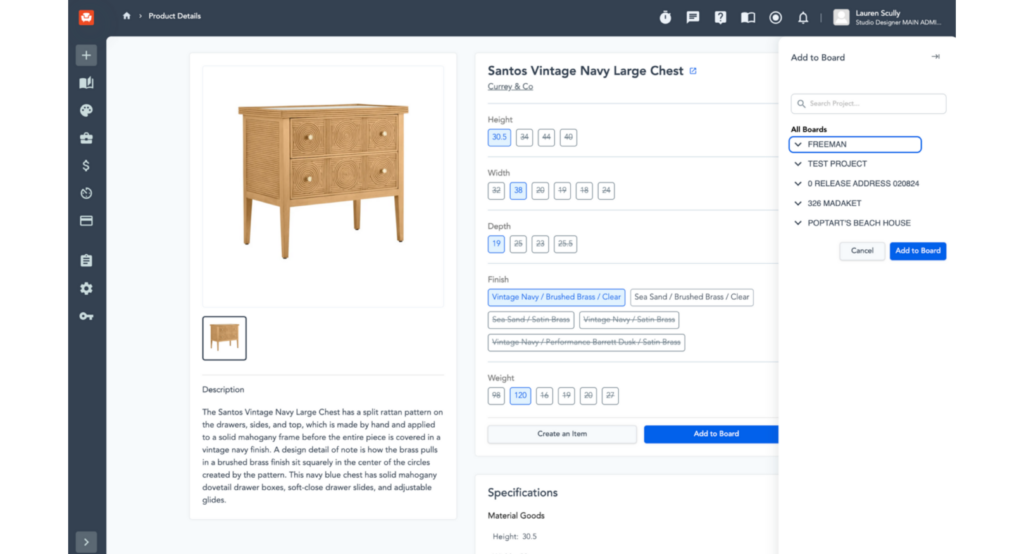
After months of development and early access testing with designers across the country, Catalog is now rolling out to Studio Designer customers. Built directly into Studio Designer, it brings product discovery, concept visualization, and project specification into one connected experience, so the work you do finding the right piece leads somewhere useful, without the manual steps in between. This is a meaningful shift in how designers work, and we are excited to share it.
Browse 500,000+ Products From Brands You Already Trust
Catalog gives designers access to more than 500,000 SKUs from 250+ trade-focused brands, all without leaving Studio Designer. The brand list spans lighting, furniture, fabric, and textiles, and includes names like Visual Comfort, Lee Jofa, Schumacher, Kravet, Arteriors, Four Hands, Currey & Co., Holly Hunt, Hickory Chair, and Phillips Collection. Every brand in Catalog is curated specifically for the design industry: these are specification-ready, trade-appropriate products from vendors designers already work with regularly.
To streamline your workflow, you can save your go-to vendors as Favorite Brands, keeping your most-used lines and preferred trade accounts front and center. Whether it’s a brand you specify on nearly every project or a vendor where you’ve negotiated a house discount, favoriting puts those relationships one click away, so you’re not hunting through the full catalog every time.
When you find something in Catalog, you can move forward with confidence knowing it belongs in a client proposal. No extra vetting, no second-guessing. Just products that are ready to specify.
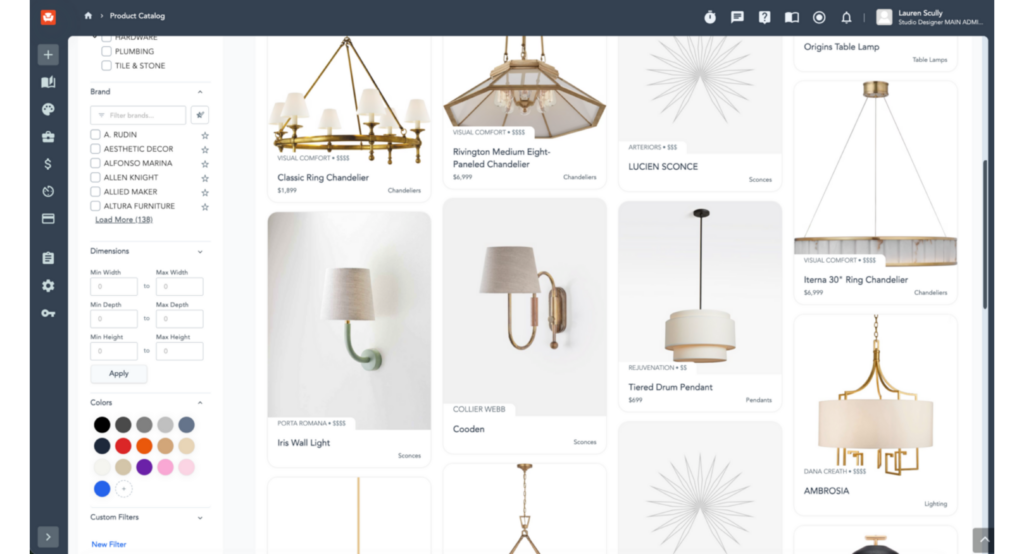
Find What You’re Looking For, Even When You Can’t Describe It
You may not always start a search with a precise product name, and Catalog is built with that in mind. Search by keyword to browse by product type, brand, or style. Switch on AI-powered search to describe what you need in plain language, the way you would explain it to a colleague. Or upload an image to find products that match a piece you already love. Filters for category, brand, dimensions, price tier, and more help narrow results from there.
The result is a search experience that meets you where you are, whether you know exactly what you want or are still figuring it out.
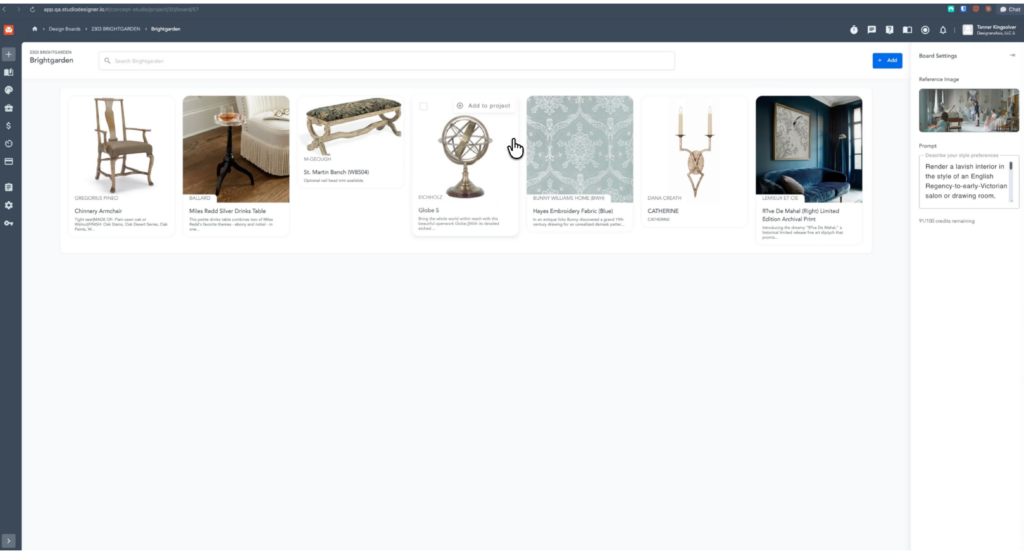
Build Concepts on Design Boards
Finding great products is only the beginning. Design Boards are visual workspaces inside Studio Designer where designers can save products from the Catalog, arrange concepts by room, and refine their direction before committing to a single project item or sharing anything with a client.
Before a project takes shape, ideas tend to pile up everywhere: Pinterest boards, saved screenshots, email threads you must dig through. Design Boards give you one place to gather it all and think through a concept before it becomes a proposal.
Visualize Concepts with AI Rendering
Your vision deserves more than a line-item list. Rendered visuals give clients something concrete to react to, turning what could be a lengthy back-and-forth into a clear, confident yes.
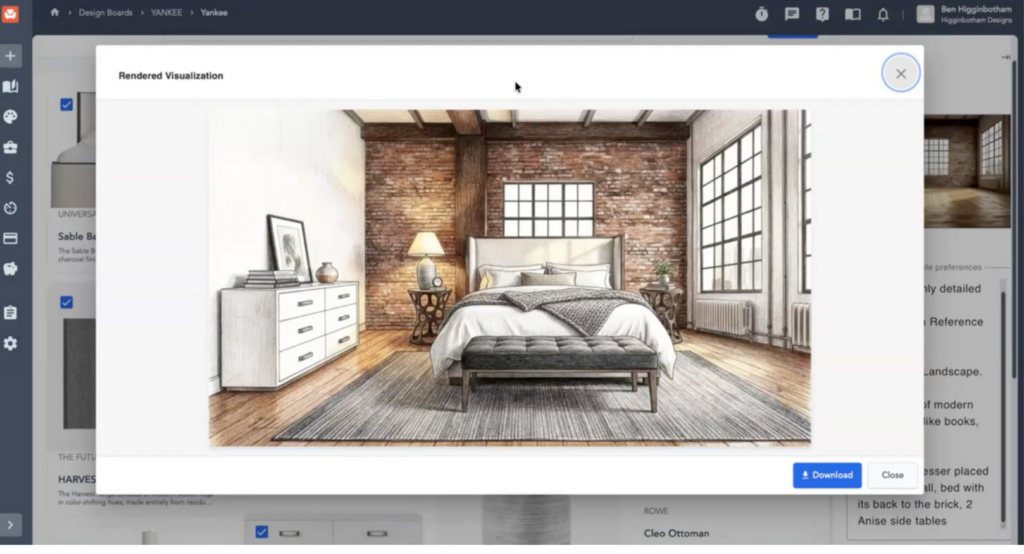
Once your board takes shape, use our built-in AI rendering tool to bring it to life. Upload a reference image of the room, add a prompt describing the mood or style — whether that’s photorealistic, watercolor, or anything in between — and the tool generates a rendered mockup of your selections in that space. No additional software and no waiting on an external renderer.
ALSO READ: AI for Interior Designers: What to Do When It Starts to Feel Like Too Much
Specify Items Directly into Your Projects
When a product is ready to commit to, convert it into a project item in one click. Assign it to a client and project, select the vendor and sales code, and move it into your project ready for procurement and accounting. Product discovery feeds directly into the rest of your Studio Designer workflow, no re-entry, no copying between tools, no risk of losing a product between the inspiration phase and the proposal. The whole process holds together.
FAQ
Is Catalog included in my existing Studio Designer subscription, or is it an add-on?
Catalog is included at no additional cost for current Studio Designer customers.
Which brands are available in Catalog?
Catalog includes 250+ trade-focused brands across lighting, furniture, and textiles, including Visual Comfort, Lee Jofa, Schumacher, Kravet, Arteriors, Four Hands, Currey & Co., Holly Hunt, Hickory Chair, and Phillips Collection, among many others.
How is Catalog different from saving inspiration on Pinterest or a moodboard app?
Design Boards let you gather and arrange concepts the same way a moodboard would, but every product on the board is already specification-ready and connects directly into your Studio Designer project. There’s no separate step to move an idea from inspiration into a client proposal.
Do I need to be a current Studio Designer customer to use Catalog?
Catalog is live now for existing Studio Designer customers. If you’re not yet a customer, you can book a walkthrough with the team to see how it fits your firm.
Let’s Show You Around
For current Studio Designer customers, Catalog is already waiting for you at no additional cost. Not a customer yet? Book time with our team for a personalized walkthrough and see how Catalog fits into the way your firm works.
Studio Designer is the leading digital platform for interior designers managing and growing their design businesses, featuring fully integrated project management, time billing, product sourcing, and accounting solutions.
Want to learn how Studio Designer can work for your design firm? Schedule a call with our team: https://www.studiodesigner.com/get-a-demo/
We can’t wait to connect.