
Budgeting is one of those parts of the design process that rarely looks the same from one project to the next. Some designers prefer to establish clear numbers from the very beginning, setting expectations early, and revisiting them often. Others start with only a loose sense of what’s possible, knowing that clarity will emerge as the design takes shape.
There’s no single “right” way to budget for a residential project. What matters is having a system that can adapt to how you work — whether you’re building a highly detailed plan or creating structure around a budget that’s still evolving.
Studio Designer supports multiple ways to approach budgeting, from precise, item-level control to fast, flexible frameworks that leave room for creative exploration. Below are three common approaches designers use, ranging from the most detailed to the most streamlined.
1. Budget by Item (Most Detailed, Most Control)
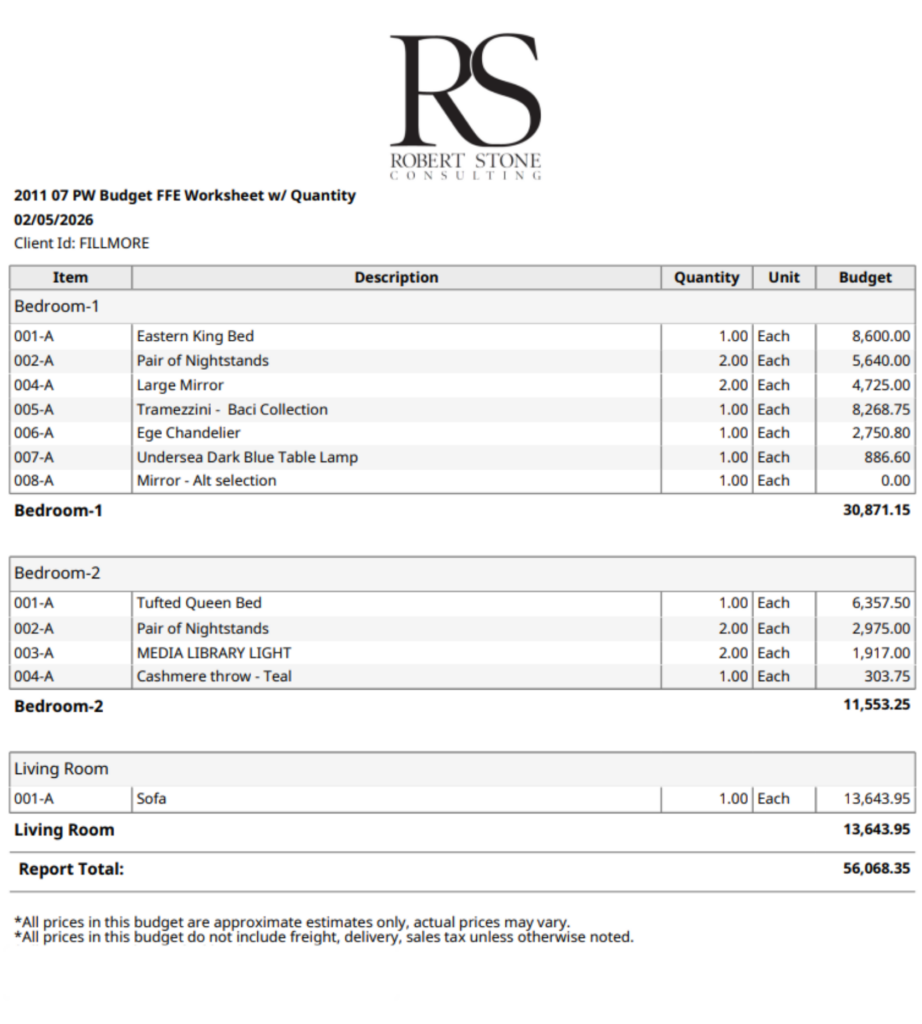
Budgeting by item offers the highest level of detail and the clearest visibility into scope. It’s a strong fit for designers who want to understand exactly what’s included from the start and maintain clear documentation as the project evolves.
This approach does require more setup upfront, but it creates a solid foundation for tracking changes and managing expectations throughout the life of the project.
How it works in Studio Designer
- Add placeholder items to your project
- Set the vendor to TBD
- Enter a budget unit amount for each item as an estimated cost
- Apply your markup automatically
- Save the items and run a Budget Report to see the full projected total
Why designers choose this approach
Designers who value precision often rely on item-based budgets to maintain clarity and control from day one. This method makes it easy to track scope changes, identify items added outside the original plan, and reference clear documentation if budgets shift later in the project.
2. Budget by Room (Fast, Flexible, Still Structured)
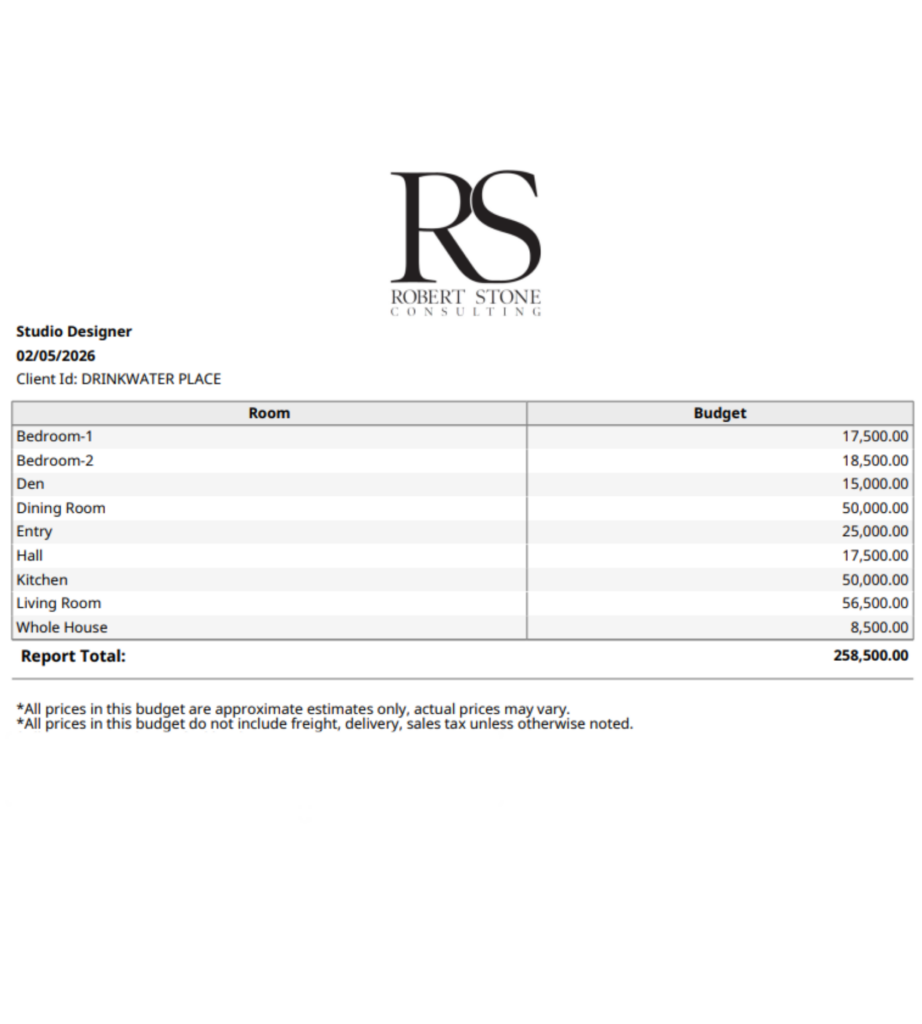
Budgeting by room is a favorite for designers who want structure without getting bogged down in individual line items early on. Instead of budgeting for a sofa, chair, cocktail table, rug, or lamp, you assign one flat budget per room.
For example, you might budget $50,000 for the Living Room — and that’s it. This approach keeps the focus on the room as a whole, rather than on individual line items, which can be especially helpful in the early stages of a project.
Key things to know:
- These budget items never have a purchase price or selling price
- They only have a budget amount
- Each room has its own placeholder budget item
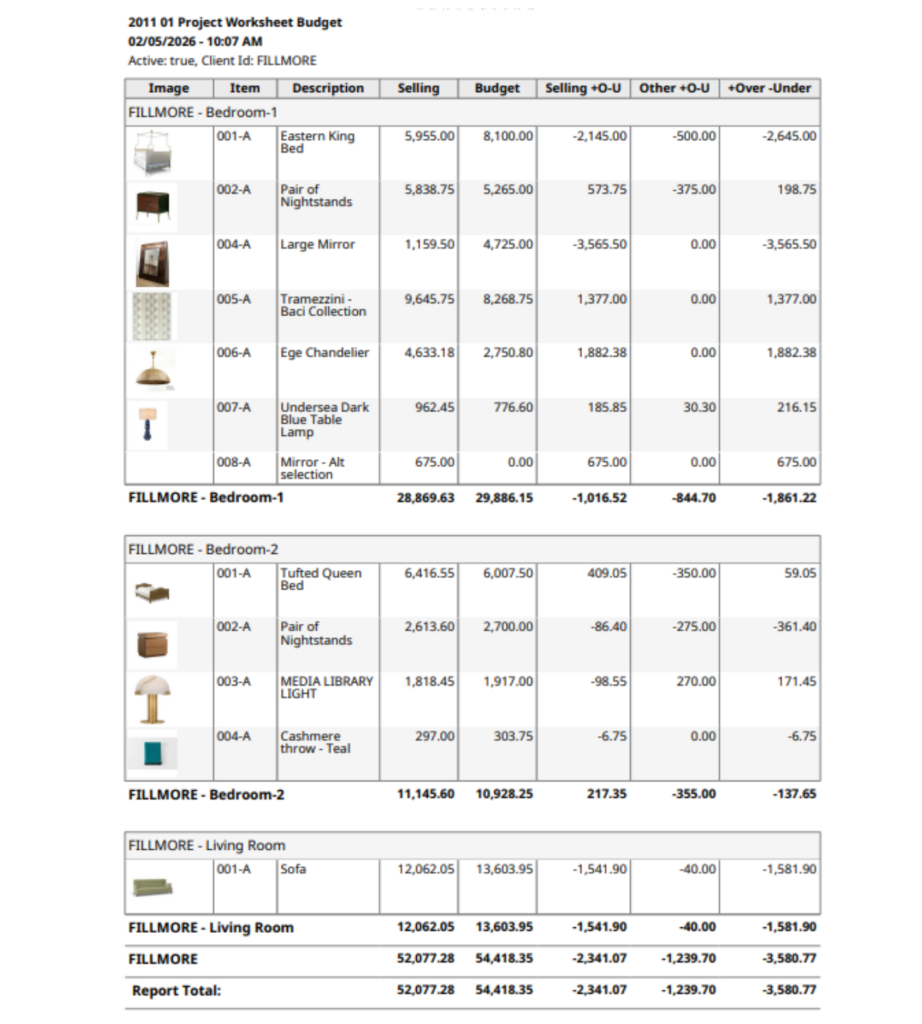
As you begin adding real products to the project, you’ll compare:
- Original room budget
- Actual totals per room
Variance — how far over or under budget you are
Why designers choose this method:
Designers often rely on room-based budgets when flexibility matters more than precision. This method takes very little time to set up, allows creative decisions to evolve naturally, and makes it easier to communicate an overall project budget to clients early on. It’s especially effective when selections are still in flux, and the design vision is still taking shape.
3. One Project-Level Budget Line Item (Fastest Option)
Using a single project-level budget line item is the quickest way to establish a financial framework. It’s intentionally high-level and works best when the goal is to create early structure without getting into details too soon.
This approach mirrors room-based budgeting, but instead of assigning budgets to individual spaces, you create one placeholder that represents the entire project.
How it works in Studio Designer
- Create a single placeholder budget item
- Place it in a room labeled “Whole House” or “Budget”
- Enter the total estimated project budget
- Run a budget variance report to track changes over time
Why designers choose this approach
Designers often use a project-level budget early in the planning process, when flexibility is critical, and many decisions are still conceptual. This method takes only minutes to set up, makes it easy to shift funds between rooms as priorities evolve, and provides a clear financial reference point until more detail is needed.
In conclusion
Every residential project starts with a different level of certainty, and that uncertainty doesn’t disappear overnight. Budgets shift. Priorities change. Design decisions evolve. The goal isn’t to lock everything in too early. It’s to stay informed as the project moves forward.
Whether you prefer detailed item-based budgets, high-level room allocations, or a single project-wide placeholder, Studio Designer gives you the flexibility to build structure without limiting creativity. You can start with as much or as little detail as the moment requires, then refine your approach as the project comes into focus.
When budgeting tools adapt to the way designers actually work, they support better conversations, clearer expectations, and more confident decision-making for you and your clients.

Written by Robert Stone
Director of Client Experience
With over 20 years of experience in the design industry, Robert Stone brings both expertise and passion to his role as Director of Designer Experience at Studio Designer. He partners closely with Sales, Marketing, and Product teams to make sure designers have a seamless experience from first introductions to long-term partnership. Known for his deep understanding of the design community, Robert is dedicated to ensuring that every interaction with Studio Designer reflects our commitment to putting designers at the center of all we do.
Studio Designer is the leading digital platform for interior designers managing and growing their design businesses, featuring fully integrated project management, time billing, product sourcing, and accounting solutions.
Want to learn how Studio Designer can work for your design firm? Schedule a call with our team: https://www.studiodesigner.com/get-a-demo/
We can’t wait to connect.