

Custom Checkout Gets a Brand Makeover, PTO Requests Go Live, and Catalog Gets Smarter
Studio Designer exists to help interior designers run their firms with less friction and more polish, and this month’s release leans hard into both. The centerpiece is a fully rebranded checkout experience that finally lets your client-facing payments look like your firm instead of a generic payment form. Beyond that, Payroll firms get long-awaited PTO tools, time tracking gets a redesign and a mobile app, Quebec firms get proper tax support, and Catalog products now carry full manufacturer specifications through to the project. Here’s what’s new.
Custom Checkout
Clients now experience your brand at the exact moment they’re deciding to say yes to a proposal. Font selection with live preview means you can match your visual identity before a single change goes live, and that same control carries into the PDF payment experience itself, where layout, font size, colors, and logo settings can all be previewed together before clients ever see them. Logo placement, alignment, and sizing are configurable in the same preview-first way, and primary, header bar, and background colors now carry through the entire checkout flow. This branding control is available to StudioPay-connected accounts.

Every account, StudioPay-connected or not, also gets access to new professionally designed invoice templates and proposal themes ready to send immediately or refine further in Report Builder. And clients can now approve proposals directly from the PDF experience, on desktop or mobile, with that approval flowing into Studio Designer under the same status and history you already track. Fewer emails just to confirm a yes.
Display preferences are more flexible too. Rather than every client seeing the same company-wide defaults, presentation settings can now be set per client record, with existing clients updatable in bulk so nothing needs to be reconfigured one at a time.
Payroll & Time Tracking
Paid Time Off Requests are now generally available for Payroll firms (reach out to support to get it enabled). Payroll Admins can review, approve, or decline requests directly inside Studio Designer, seeing employee, dates, hours, policy, and available balance in one place, with approved requests automatically updating balances and applying the correct payroll adjustments. Employees can submit requests themselves, previewing their balance before and after approval, with company holidays excluded automatically. What used to live across email threads and spreadsheets now lives in one place.
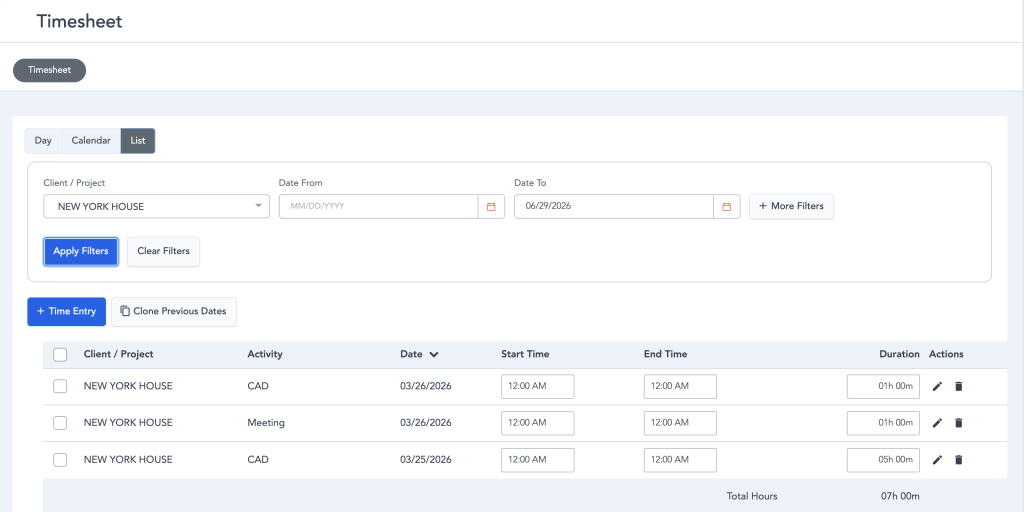
Time tracking is getting a redesign through the Early Access Program, available now to all Payroll firms and open for non-Payroll accounts to opt into. The new Timesheet List supports inline editing, cloning entries, switching between end time and duration, and bulk actions across multiple entries at once, with invoiced and paid entries locked so it’s clear what can no longer change. A new Day View adds a focused look at a single day, letting you review, edit, delete, or clone a full day of entries without losing your place. Full availability for all firms arrives in early fall.
Catalog
Catalog products now carry complete manufacturer specification data, including finish, voltage, materials, and country of origin, and that data carries forward automatically when a product is saved to a design board or added to a project. Certain fields can still be adjusted to fit a project while the manufacturer’s core specification stays intact underneath, with both the original spec and your edits appearing on the Specification tab, ready for a vendor quote or purchase order. Product Specification Reports are now more customizable too, with control over which fields display, layout, branding, and optional details, and item-level specification data is easier to view and update directly.
Tax, Settings & Reliability
Quebec firms now have proper GST and QST support built throughout the platform, and new accounts arrive pre-configured with professional defaults based on sign-up information, so setup starts further along instead of from a blank page. A long list of fixes rounds out the release across Reports, Time Billing, Documents, Inventory, Items, Payments, and Accounting, covering everything from more accurate vendor balance reporting to correct HST calculation on Canadian time billing, consistent sales tax display on items, and payments that were previously stuck in Created status now updating as expected.
Taken together, this release is about trust and polish: a checkout experience that reflects your firm, payroll and time tracking that stays inside the platform instead of spilling into spreadsheets, and a foundation of fixes that make the numbers behind the scenes hold up. Less admin, more designing, and more confidence that the data underneath it all is right.
Studio Designer is the leading digital platform for interior designers managing and growing their design businesses, featuring fully integrated project management, time billing, product sourcing, and accounting solutions.
Want to learn how Studio Designer can work for your design firm? Schedule a call with our team: https://www.studiodesigner.com/get-a-demo/
We can’t wait to connect.