


Key Takeaways
- However it happens, whether it’s a discontinuation, a stock issue, or a spec change, the client doesn’t experience the “why.” They experience how fast and how clearly the issue gets resolved.
- Handled poorly, a product swap can read to a client as disorganization, even when the delay wasn’t the designer’s fault. Handled well, it barely registers as a disruption at all.
- A slow, vague update (a one-line email with no visual and no revised proposal) tends to generate more client questions and follow-up calls than the original problem did.
- Studio Designer’s Catalog lets designers search over 500,000 products from trade-ready vendors by vendor, price range, and dimension, all without leaving the platform, which shortens the gap between “this is unavailable” and “here’s the replacement.”
- Swapping the item directly on the proposal, adding a revised date, and generating a rendering gives the client a clear, visual before-and-after instead of a line-item change buried in an email.
- The result for the client: fewer confusing back-and-forths, a proposal that still looks intentional rather than patched together, and a faster path to approving the substitution and moving on.
A Product Fell Through. Now What?
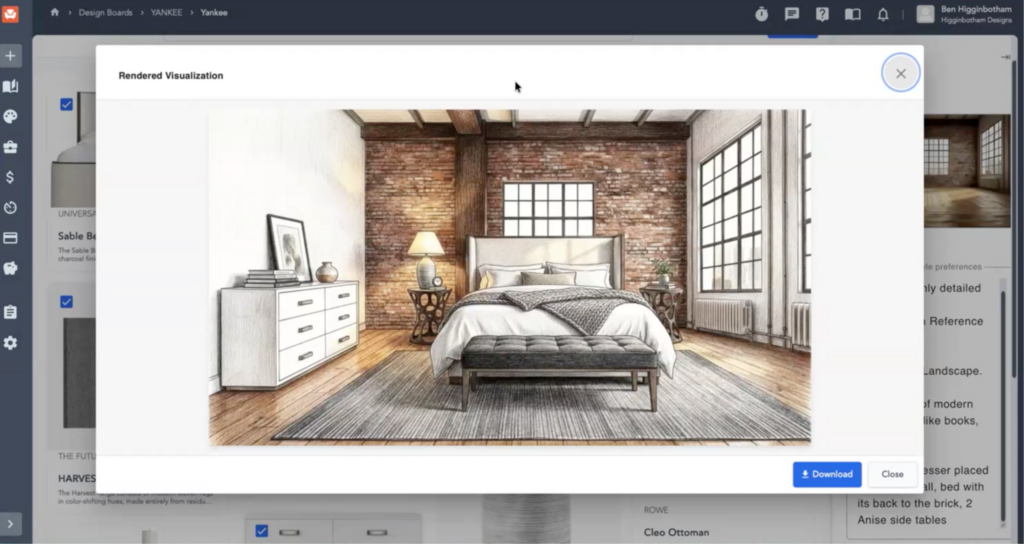
Search for a comparable item by vendor, price range, and dimension inside Catalog, Studio Designer’s built-in product search tool, which pulls from 500,000+ products across trade-ready vendors without needing to leave the platform. Then swap it into the existing proposal and flag the change with a revised date so your client can see exactly what’s different. You can also drop the new item into a rendering, so the client isn’t just reading about a substitution, they’re seeing it.
That’s the short version, and it works whether the item was discontinued outright, went out of stock, got pushed back another two months, or just came back from the vendor at a different price than what you quoted. Here’s why it matters and how the workflow actually plays out.
Why This Keeps Happening
If it feels like you’re dealing with an unavailable or changed product every few weeks, that’s not a coincidence. It shows up in a few different ways:
- Discontinuation. A fabric, finish, or piece gets pulled from the line entirely and isn’t coming back.
- Out of stock. The item exists, but not right now, and there’s no clear timeline for when it will.
- Extended lead times. Supply chain issues from the pandemic never fully worked themselves out. A vendor might quote three weeks and actually deliver in eight.
- Spec or price changes. The product is technically still available, but the dimension, finish, or price has shifted since you specified it, which can throw off a proposal just as much as an outright unavailability.
This isn’t the edge case in interior design work anymore. It’s a routine part of running a project.
The Old Way: A Web Search Scramble
Before a tool like Catalog existed, the fix looked the same for most designers regardless of which of these situations they hit: open a browser, start searching, and try to find something in the same ballpark on price, size, and color. Usually a rep or vendor points you toward what’s currently in stock, and it’s close, but rarely identical. Then you’re piecing together specs from different vendor sites, cross-checking dimensions by hand, and hoping the replacement doesn’t clash with everything else already specified for the room.
It works, eventually. But it eats time you don’t have, and it’s easy to miss something, like a dimension that’s just slightly off, that only becomes a problem once the piece arrives.
Studio Designer’s Catalog gives you access to over 500,000 products across trade-ready vendors, searchable by vendor, price range, and dimension, all in one place. Instead of jumping between vendor websites every time something falls through, you search once, inside the platform you’re already specifying and proposing in, no matter which of the above is the actual cause.
Here’s what that looks like in practice:
- Search by what actually matters. Filter by vendor, price range, and dimension to find something close to the original, not just visually similar, but close on the specs that determine whether it’ll actually fit the space and the budget.
- Swap it into the proposal. Replace the unavailable or changed item directly on the existing proposal instead of rebuilding it.
- Flag the change. Add a revised date to the proposal so your client can see at a glance that something was updated, and what it was.
Show them, don’t just tell them. Generate a rendering with the new product in place and send it over. A client seeing the replacement in the room reads very differently than a client reading a line-item substitution in an email.

How to Tell Your Client a Product Was Replaced or Changed
The update itself matters less than how it’s presented. A client who gets a vague email saying “we had to swap out the sofa” is going to have more questions than one who gets a revised proposal and a picture of the new piece in the room.
A few things make that communication land cleanly:
- Update the proposal, don’t just mention the change verbally or in passing. The proposal is the record of what’s being ordered, so it should reflect reality. Swapping the item directly on the existing proposal keeps everything in one place instead of scattering the change across an email thread.
- Add a revised date. This is a small detail that does a lot of work. It tells the client, at a glance, that this version is different from the one they saw before, without them having to hunt for what changed.
- Include a rendering. A line-item swap reads as an administrative update. A rendering reads as “here’s what your room is actually going to look like.” Generating an image of the new product in place turns an abstract substitution into something the client can react to immediately, and it heads off the back-and-forth of them trying to picture it from a product name and a swatch.
- Lead with the reason, briefly. Whether it’s a discontinuation, a stock issue, or a lead time that blew past what was quoted, a short explanation for why the change happened goes a long way. Clients are generally understanding about supply chain issues, they’re less understanding about feeling like something changed without being told.
Put together, this turns what could be an awkward conversation into a quick, visual update, one the client can approve in a glance rather than one that requires a phone call to untangle.
Why This Matters for the Client Relationship
An unavailable or changed product is already a small disruption. How you handle it decides whether the client notices a hiccup or a scramble. Being able to search, swap, and show the new option quickly, without three emails and a delayed proposal revision, keeps the whole exchange low-friction regardless of whether the item was discontinued, backordered, or just came back at a different price. The client sees a clear, revised proposal and a rendering of what’s coming their way. What they don’t see is you searching six vendor sites trying to find something that fits.
Why do products become unavailable so often in interior design?
Vendors discontinue finishes, run out of stock, and change prices or specs more often than most designers would like, and supply chain delays that started during the pandemic have made lead times unpredictable on top of that.
How do you find a replacement for a discontinued or unavailable product?
Search by vendor, price range, and dimension to find the closest match. Doing this across trade-ready vendor catalogs in one place, rather than site by site, is significantly faster and easier to compare.
Can I search multiple vendors at once for a similar product?
Yes. Studio Designer’s Catalog searches across trade-ready vendors simultaneously, so you’re not manually checking each vendor’s site one at a time.
What if the product itself didn’t change, but the price did?
The same workflow applies. Update the proposal to reflect the new price, add a revised date, and communicate the change directly rather than letting the client discover it later in an invoice.
Studio Designer is the leading digital platform for interior designers managing and growing their design businesses, featuring fully integrated project management, time billing, product sourcing, and accounting solutions.
Want to learn how Studio Designer can work for your design firm? Schedule a call with our team: https://www.studiodesigner.com/get-a-demo/
We can’t wait to connect.